Pedal Commander
- 3.5
- Rating
- 100.00K
- Installs
- Free
- Price

 Analysis by App-foxy
I approached Pedal Commander as a driver would: not as a performance product to admire on a shelf, but as an app I would open beside my vehicle, connect to the hardware, and expect to behave predictably when I needed it. Developed by VITALEN AUTO PERFORMANCE INC, this free Android app sits in the Auto & Vehicles category and is designed to control a compatible throttle-response controller through Bluetooth. Its purpose is narrow, but that is also its appeal. It is not trying to replace navigation, vehicle diagnostics, or a full driving assistant.
The basic idea is easy to understand. A vehicle’s accelerator can sometimes feel softer or slower than a driver prefers, especially when moving away from a stop or joining traffic. The Pedal Commander system is intended to alter that response, while the app provides the phone-based control layer. In my experience, the important question is not whether the interface looks advanced; it is whether the connection, selected setting, and driving situation all line up without unnecessary confusion.
Where the experience usually gets stuck
The first point worth making is that the app is not a standalone throttle upgrade. Installing it on a phone does not, by itself, change how the vehicle responds. The app is useful when paired with the associated Bluetooth controller, so anyone expecting an ordinary software-only adjustment will be disappointed. That distinction should be clear before downloading it.
You May Also Like

 Google Keep - Notes and lists
Google Keep’s Quiet Growth Shows the Appeal of Simpler Notes
As mobile work gets busier, Google Keep keeps winning a simple contest: capture a thought quickly, find it later, and get on with the day.

 Blood Strike: 2.5 Anniversary
Blood Strike’s Loadouts Turn Every Drop Into a Tactical Gamble
A close look at Blood Strike’s custom loadouts: how fast access to signature weapons reshapes its battle royale rhythm, rewards preparation, and narrows the gap between fights.

 Pandora - Music & Podcasts
Pandora’s Music Is Easy to Start, but Harder to Recover
Pandora’s strength is its low-effort path from a seed to a station. Its weak spot is how much confidence it asks you to place in connection, setup, and quiet recovery.

 8 Ball Pool
 Is Built on Rivalries, Rematches, and Routine
A close look at the rivalries, rematches, shared routines, and unanswered safety questions that turn a quick pool match into a persistent mobile community.

 Samsung Music
’s Quiet Strength Is Playing What You Already Own
Its reach comes less from spectacle than from dependable access to a personal library. That simplicity is both the app’s strongest retention engine and its ceiling.

 AccuWeather: Weather Radar
AccuWeather Review: A Quick, Clear Forecast for Everyday Decisions
For everyday plans, the best forecast is the one you can understand quickly. AccuWeather makes rain timing, radar, and local conditions easy to act on, with a few trade-offs.
More From Our News Desk



Another common source of frustration is treating Bluetooth pairing as a one-time event that can never need attention again. In real use, phones change, vehicles are shared, Bluetooth connections are interrupted, and the app may not immediately show the controller in the way a user expects. I would begin with the vehicle stationary, the phone close by, and the controller installed according to its own instructions. Trying to solve a connection issue while preparing to drive is an unnecessary distraction.
The app’s store summary presents it as an advanced throttle-response controller application for Bluetooth, but the practical experience depends on the whole chain: the vehicle, the physical controller, the phone’s Bluetooth state, and the selected driving setting. If one link is not ready, the app can appear to be the problem even when the issue is elsewhere.
The most important safety habit is to make changes only while parked. I would never browse modes, reconnect Bluetooth, or troubleshoot the application while the vehicle is moving. A quicker accelerator response can feel very different in a crowded parking area or during a gentle maneuver, so a calm, stationary setup is part of using the product responsibly.
Why the first connection can feel less simple than expected
Users often arrive with an assumption that “Bluetooth” means the same process as connecting headphones. A vehicle controller is a different kind of accessory, and the application needs to communicate with that specific device rather than simply play audio. If the phone has several saved Bluetooth devices nearby, or if another phone has already connected to the controller, the first attempt may not go smoothly.
My practical approach would be to close unrelated Bluetooth accessories temporarily, keep the controller powered as intended by the installation, and open the app after checking that the phone’s Bluetooth function is active. If the controller does not appear, I would avoid repeatedly tapping every option. Instead, I would stop, confirm that the physical installation is secure, and restart the connection process in an orderly way.
This is also where expectations about the vehicle matter. Pedal Commander changes the feel of accelerator input; it does not turn a vehicle into a different engine, add horsepower, repair a mechanical fault, or compensate for poor tires and road conditions. If the complaint is weak acceleration caused by a mechanical or maintenance problem, an app-based controller is the wrong place to begin.
What the rating suggests about the experience
The app has an average rating of 3.5 from around 688 ratings, alongside around 246 written reviews. I read that as a sign of a product that works well for a meaningful group of drivers but can create friction when pairing, compatibility, or expectations are not handled carefully. It has passed the threshold of over 100K installs, so it is not an obscure experiment, yet its audience is naturally smaller than that of a general driving app.
That mixed impression feels understandable. A driver who already owns the compatible controller and wants convenient Bluetooth adjustment may find the app useful every day. Someone downloading it without the hardware, or expecting a diagnostic tool, will see little value. The rating should therefore be considered alongside the product’s specific purpose rather than treated as a simple measure of whether it is “good.”
Setup checks that prevent avoidable trouble
Before opening the app, I would confirm four practical points. First, the physical controller must be installed correctly for the vehicle. Second, the phone should have Bluetooth enabled. Third, the vehicle should be parked safely with the ignition or power state set as required by the controller’s instructions. Fourth, I would make sure the phone is not already being used by another device that could interfere with the connection.
These checks sound basic, but they separate a genuine application problem from an installation problem. If the controller is loose, incorrectly connected, or not receiving power as intended, changing phone settings will not solve it. Likewise, if the phone connects to the controller but the vehicle’s accelerator behavior remains unchanged, I would inspect the physical connection and selected control state before assuming the app has failed.
Compatibility is another decision point. The app belongs to a specific hardware ecosystem, so I would verify that the controller and vehicle are supported before spending time on setup. This is particularly important for people who switch between vehicles or buy a used controller. A free download does not guarantee that every vehicle, controller revision, or phone arrangement will offer the same experience.
The application supports Android devices from version 7.0 onward, which keeps it accessible to many older phones. Still, an older operating system can bring its own Bluetooth quirks, and a phone that struggles with other wireless accessories may not be the best control device. I would use a phone with a reliable battery and stable wireless behavior rather than an aging spare that is already unreliable.
A sensible first-use routine
For the first session, I would connect while parked and test the selected response gently in a quiet, familiar area. I would not begin by choosing the most aggressive-feeling option simply because it sounds exciting. The point is to learn how the accelerator reacts in that vehicle, with that driver’s foot control, before using the setting in traffic.
A useful routine is to make one change at a time and remember what the vehicle felt like before the change. If the response becomes too abrupt, return to a calmer setting rather than compensating with sharper pedal movements. This gives the driver a reference point and makes troubleshooting easier. If several settings are changed together, it becomes difficult to tell whether a sensation came from the app, the road, or the driver’s adjustment.
I would also avoid judging the system during a stressful moment, such as merging into fast traffic or driving on a wet surface. A throttle-response controller changes input behavior, not the available grip. On slippery roads, a smoother response may be more useful than a lively one, even if the latter feels more entertaining during a dry test.
How to tell a connection problem from a control problem
A connection problem usually appears before the app can reliably communicate with the controller. The device may not appear, the connection may drop, or the application may behave as though the accessory is unavailable. In that situation, I would focus on Bluetooth, power, distance, and whether another phone is connected.
A control problem is different. The app may appear connected, but the vehicle does not respond as expected after a setting change. I would then check whether the physical controller is properly seated, whether the vehicle is in the correct power state, and whether the selected setting was actually applied. I would also compare the behavior with the controller’s normal or least intrusive option, always while stationary first.
If the vehicle shows a warning light, develops an unusual engine or pedal behavior, or feels unsafe, I would stop using the controller and seek qualified automotive help. The app is not a substitute for diagnosis. Continuing to experiment through the phone could obscure a vehicle fault instead of fixing it.
Recovering the workflow when something goes wrong
When a previously working connection disappears, my first response would be deliberately boring: park, switch off the vehicle as appropriate, close the app, and check Bluetooth again. I would then reopen the application and give the connection a clean attempt rather than repeatedly changing settings. This avoids creating a confusing trail of half-completed pairing attempts.
If that does not help, I would move the phone closer to the controller and temporarily disconnect other nearby Bluetooth accessories. I would also check whether another phone in the vehicle has taken the connection. Shared vehicles are a realistic source of confusion because the accessory may still be associated with a different handset or because two drivers remember different settings.
Restarting the phone can be worthwhile when Bluetooth behaves inconsistently, but I would treat it as a reset, not a cure for an installation issue. If the problem returns immediately, the next step should be checking the physical controller and following the manufacturer’s support guidance. Reinstalling an app can remove local software friction, but it cannot repair a loose connector or an incompatible hardware arrangement.
One practical tip is to keep a simple mental record of what changed. If the app stopped connecting after a phone update, a vehicle battery event, or a new Bluetooth accessory was introduced, that clue is more useful than randomly tapping through menus. Similarly, if the behavior changed after the controller was moved or the vehicle was serviced, inspect the installation before blaming the application.
Recovering without losing confidence in the vehicle
Throttle-response changes can make a driver question the vehicle itself, especially when the accelerator feels sharper than expected. I would return to the gentlest available behavior and drive only when the response feels predictable. If the vehicle still feels abnormal with the controller disconnected or inactive, that points away from the app and toward a vehicle or installation concern.
This distinction matters because the app’s job is adjustment, not reassurance. It can help select a response that suits a driver, but it cannot confirm that a vehicle is mechanically healthy. A well-organized recovery process protects both the driver and the usefulness of the product: restore a known state first, then investigate one variable at a time.
When the app is not the right answer
I would skip this app if I did not own the compatible controller. There is no reason to install a dedicated control application simply because the name sounds relevant to acceleration. I would also look elsewhere if my main need were navigation, fuel tracking, maintenance reminders, fault-code reading, or trip logging. Those are different categories of tool, and Pedal Commander is not designed to replace them.
It may also be a poor fit for a driver who prefers the vehicle’s factory throttle behavior and does not want another wireless connection to manage. The physical controller adds a layer between the pedal input and the driving experience, while the app adds a phone-based control layer on top. Some drivers will appreciate that flexibility; others will see it as needless complexity.
Drivers who regularly lend their vehicle to family members should think carefully about consistency. A response setting that feels comfortable to one person may feel too sudden to another, particularly in tight spaces. If several people use the vehicle, I would agree on a conservative setting and explain that the accelerator may feel different. For a new or nervous driver, a more predictable factory response may be preferable.
The app is also not a performance solution in the broad sense. It does not add engine power, improve braking, increase traction, or make a vehicle safer at high speed. Its value is in changing perceived pedal response. That can make ordinary driving feel more immediate, but it should not be confused with a mechanical upgrade or a replacement for responsible driving.
How it compares with ordinary alternatives
The usual alternative is simply using the vehicle as delivered. That option has fewer setup steps and no extra Bluetooth dependency, and it remains the better choice for anyone satisfied with the factory response. The trade-off is that the driver cannot tailor the pedal feel through this type of controller.
Another alternative is a professional mechanical or electronic modification, but that is a different path with different costs, risks, and expertise requirements. Pedal Commander is more approachable for someone who wants an adjustable driving feel without treating the vehicle as a full performance project. However, the simplicity is relative: the hardware must still be installed correctly, and the phone connection must remain dependable.
General vehicle apps may offer broader information, but they will not serve the same purpose. A diagnostic application can help investigate faults; a navigation app can guide a trip; a maintenance app can organize service records. None of those is a direct substitute for throttle-response control, just as this app is not a substitute for them. The right choice depends on whether the user wants a change in pedal feel or information about the vehicle.
Who will get the most from it
I see the strongest use case in a driver who already has the compatible controller installed, understands that the product changes throttle response rather than engine output, and wants to adjust the feel for different everyday situations. That could mean preferring a gentler response in a crowded parking area and a more immediate feel when joining a clear stretch of traffic, always with careful testing and attention to road conditions.
It can also suit an enthusiast who enjoys fine-tuning the driving experience but does not want to carry out a larger modification. The app makes the adjustment process more convenient than relying on a fixed setting, provided the Bluetooth connection is stable and the driver is willing to treat each change thoughtfully.
I would be more cautious recommending it to someone who wants an install-and-forget experience. The combination of physical hardware, Bluetooth communication, vehicle compatibility, and driver adaptation means there are several points where friction can appear. A person who dislikes troubleshooting or already has an inconsistent phone connection may prefer the simplicity of the factory setup.
The application is free to download, carries an Everyone content rating, and includes in-app purchases listed from $0.99 to $9.99 per item. I would consider those purchase options only after confirming that the hardware and vehicle arrangement work as intended. Paying for additional items before resolving basic connectivity would make the experience more frustrating, not less.
Its release on February 14, 2018, and current version 3.3.16 show that this is an established app rather than a brand-new utility. That history may reassure drivers who want a product with time in the market, while the current version is the one I would use when checking behavior on a supported Android phone. The developer remains VITALEN AUTO PERFORMANCE INC, and the app’s identity is closely tied to that company’s controller ecosystem.
My practical verdict after weighing the friction
I think Pedal Commander is worthwhile for the right owner, but the phrase “right owner” does most of the work. If you have the compatible controller, want to adjust accelerator feel, and are comfortable following a careful Bluetooth setup, the app can be a useful part of daily driving. Its best quality is focus: it does one specialized job instead of burying that job inside a crowded vehicle dashboard.
At the same time, I would not recommend downloading it as a general experiment. Without the hardware, it offers no meaningful standalone benefit. Even with the hardware, the experience can be undermined by pairing confusion, an incorrect installation, a shared phone connection, or unrealistic expectations about power and vehicle performance.
My advice is to approach it methodically. Confirm compatibility, install the controller correctly, connect while parked, begin with a mild response, and change only one thing at a time. If the vehicle behaves strangely, stop and investigate the vehicle or installation rather than assuming the app can correct it. That workflow turns the product from a source of uncertainty into a controlled adjustment tool.
Overall, I would recommend it to drivers who specifically want Bluetooth-based throttle-response control and are prepared for a little setup discipline. I would steer everyone else toward the factory accelerator behavior or a different kind of automotive app. The 3.5 average reflects that balance well: there is genuine usefulness here, but it depends heavily on compatible hardware, sensible expectations, and a patient first setup.
FAQs for Pedal Commander
01What is Pedal Commander and how does it work?
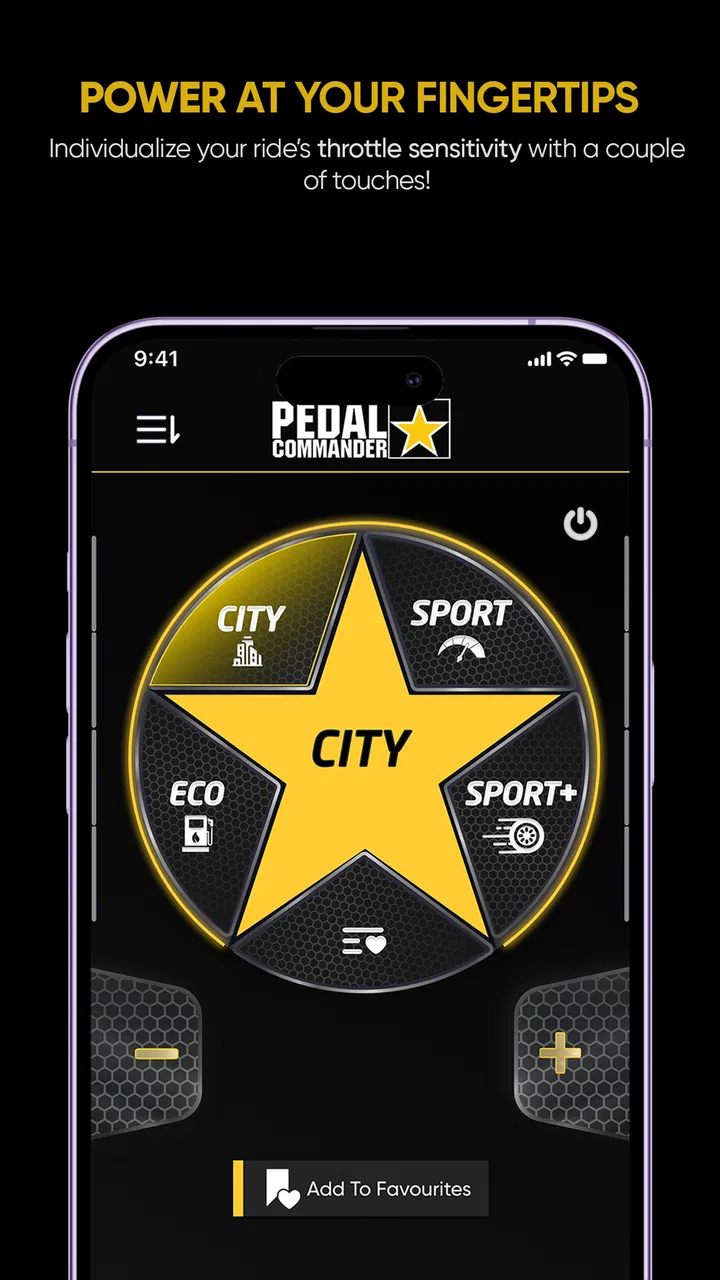
Pedal Commander is a performance enhancement app designed to improve the throttle response of your vehicle. By connecting to your car's electronic control unit (ECU), it modifies the signal sent to the throttle, providing quicker acceleration and a more responsive driving experience. It offers various modes to suit different driving preferences, such as Eco, City, Sport, and Sport+. This allows users to customize their driving experience based on their needs.
02Is Pedal Commander compatible with my vehicle?
Pedal Commander is compatible with a wide range of vehicles, including most models from manufacturers like Ford, Toyota, BMW, and more. However, it's essential to check the compatibility list on the Pedal Commander website or within the app itself before purchasing. Compatibility is crucial to ensure the device works correctly with your vehicle's make and model.
03How easy is it to install Pedal Commander?
Installing Pedal Commander is relatively straightforward and does not require any special tools. Typically, it takes about 10-15 minutes. The device connects to your vehicle’s accelerator pedal sensor, and the app guides you through the process with step-by-step instructions. No permanent modifications to your vehicle are required, making it a user-friendly option for enhancing performance.
04Does using Pedal Commander affect my vehicle's warranty?
Using Pedal Commander should not void your vehicle's warranty. It is designed to be a plug-and-play device that can be easily removed without leaving any trace. However, it is always advisable to check with your vehicle's manufacturer or dealership to confirm their policy regarding aftermarket devices. Ensuring that you have all the necessary information beforehand is crucial.
05What are the main benefits of using Pedal Commander?
The primary benefits of using Pedal Commander include improved throttle response, customizable driving modes, and enhanced driving pleasure. It allows for quicker acceleration, which can be particularly useful in situations requiring fast lane changes or overtaking. Additionally, the Eco mode can help improve fuel efficiency, making it a versatile tool for both performance enthusiasts and everyday drivers.
Pros
- Easy to install and use interface.
- Enhances throttle response significantly.
- Customizable driving modes available.
- Improves vehicle performance noticeably.
- No permanent changes to vehicle systems.
Cons
- May void some vehicle warranties.
- Can increase fuel consumption.
- Higher price compared to competitors.
- Requires manual adjustments for modes.
- Not compatible with all vehicle models.

Pedal Commander
Gallery